Why AI needs company context, not just a model
For indexed retrieval, we use the access metadata each connector supplies to scope results to the requesting user. What permissions are available depends on the connector.
Retrieving context at query time
When an agent workspace receives a query, we use the query to search the indexed company context and retrieve relevant records.
We don't put the entire company's data into the model's context. The retrieval layer selects the information relevant to the current request and makes that subset available to the model.
The model reasons over the retrieved information. Our retrieval system determines which information is available to it.
Index once, use supported models
Omni indexes company data once and makes that indexed context available to different AI models. The index contains the searchable representation of information from connected sources. Model execution happens separately. Switching reasoning models doesn't require reindexing company data or reconnecting sources. Changing the embedding provider requires reindexing.
Supported providers include OpenAI, Anthropic, Gemini, AWS Bedrock, Vertex AI, Azure AI Foundry, and OpenAI-compatible endpoints.
Separating indexing from model execution
A team may switch providers because of cost, latency, model quality, availability, or the requirements of a particular agent. The underlying company data need not be indexed again when only the reasoning model changes.
The same indexed company context can be used across different models. A research agent can use one model while a support workflow uses another, with both retrieving from the same underlying context. The retrieval layer remains the same while the model used for reasoning can change.
Permission-aware by design
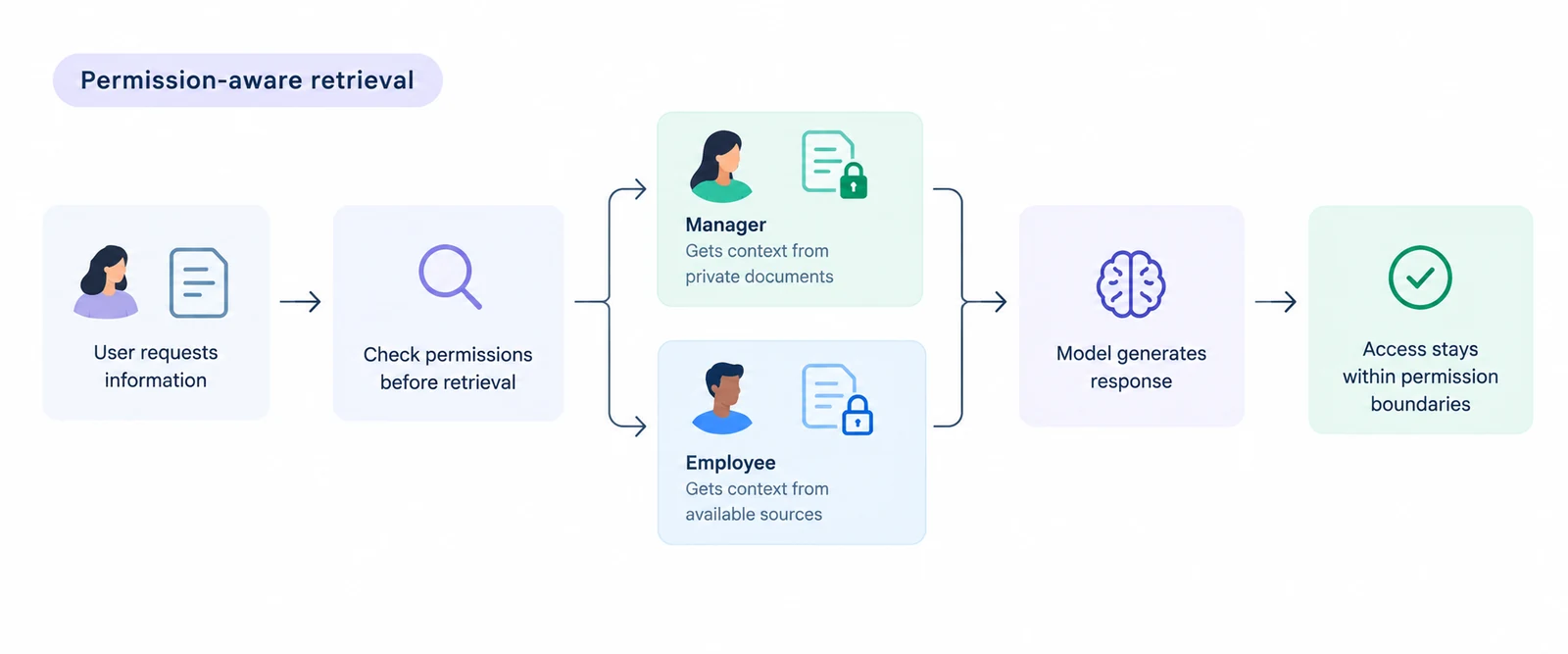
Permissions become part of the architecture as soon as an AI agent can search across company data. Omni filters indexed results using access metadata that connectors supply. Access and synchronization behavior vary by source. The diagram shows an example where the connector supplies access control lists (ACLs) for the indexed documents.
Permissions are part of retrieval
If we retrieve the private document first and check access afterwards, the restricted information has already entered the retrieval pipeline. If it is passed to the model, the permission boundary has already failed.
That's why we apply indexed access metadata during retrieval. In this example, the indexed ACL allows the manager to receive context from the private document. The employee doesn't have access to that document, so their context comes from other records they can access.
This is the basis of permission-aware AI. Where connectors provide source permissions, Omni uses those permissions so teams don't have to recreate them inside every AI workflow.
Updating indexed permissions
A user can be added to a group, removed from a project, lose access to a document, or leave the company. If the permissions associated with indexed information don't reflect those changes, the agent may have an outdated view of what the user can access.
Our connector and SDK mechanisms can propagate access-control and group-membership changes so the indexed context can reflect changes in source permissions. Omni is open source, and security teams can inspect how permissions are handled in the code.
Hybrid retrieval inside Postgres
Omni combines BM25 full-text search using ParadeDB with semantic search using pgvector. Both run inside Postgres.
Keyword retrieval for exact terms
BM25 · ParadeDBBM25 is useful when the actual terms in the query carry important
information. For example, a query for INC-4921 should find records containing that identifier. The same applies to error
codes, issue IDs, product names, API names, and technical terminology.
BM25 provides a full-text relevance signal based on the terms present in the query and indexed content.
Semantic retrieval for meaning
pgvectorSemantic search handles cases where the query and source use different terminology. There may be little exact word overlap between the two. Semantic search can still identify the relationship by comparing vector representations of the content.
This is useful for natural-language questions where the wording used by the person asking the question is unlikely to match the wording used in the source system.
Combining both retrieval signals
Keyword search can miss relevant content when the terminology differs. Semantic search can return conceptually related content when an exact identifier or term should be treated as significant.
We combine the two signals so retrieval can account for both exact matches and semantic similarity. The retrieved results then become the candidate context available to the agent. Retrieval quality matters here because the model can only reason over what makes it into that context.
Running retrieval in Postgres
Omni uses ParadeDB for BM25 full-text search and pgvector for vector search, with both operating inside Postgres. This keeps the searchable text and vector representations in the same database.
Teams do not need a separate Elasticsearch instance for keyword search or a dedicated vector database for semantic search. That means fewer systems to deploy, maintain, back up, monitor, and keep synchronized. It also gives us one place to manage the indexed company context instead of splitting retrieval across separate search infrastructure.
Explore deployment options Read our enterprise RAG benchmark
What feeds the context
Omni lets teams connect AI to company data across the tools they already use. We have 25+ built-in integrations covering different categories of company systems. Each connector brings information from its source into the shared context that agents can retrieve from.
Building a shared context across sources
We handle indexing and retrieval so agents can search across sources even when the underlying records have different structures. A CRM record is different from a Slack message, a Linear issue, or a meeting transcript. We normalize these sources into a common retrieval layer so an agent can search across them.
Built-in connectors cover common company systems, but every organization has systems that are specific to its stack. Teams can build custom sources using our Connector SDK when a required system lacks a built-in connector. The custom source can then contribute data to the same company context used by the rest of the connected sources.
FAQs
Is this the same as HubSpot's Breeze Context Layer?
No. HubSpot's Breeze Context Layer provides context for AI within the HubSpot ecosystem, while Omni creates a shared context across the different tools used by your company.
Does Omni train models on our data?
For indexed retrieval, we use your company data to find relevant information at query time, not to train models. If you use an external model provider, its terms and your settings govern how it handles the context it receives.
How are permissions kept in sync?
Omni uses access metadata supplied by connectors to scope indexed retrieval. Connectors can send access-control and group-membership updates through our SDK. Which permissions are synced, and when, depends on the connector.
Which models can use the context?
Our company context is separate from the reasoning model and can be used with supported providers including OpenAI, Anthropic, Gemini, AWS Bedrock, Vertex AI, Azure AI Foundry, and OpenAI-compatible endpoints.